Rocket Plume Observing Guide: Where to Watch and How to Read City Conditions
Find twilight rocket-plume opportunities with PlanIt Earth. Compare cities, illumination, viewing angles and directional weather, then plan a wide-angle composition in VR.
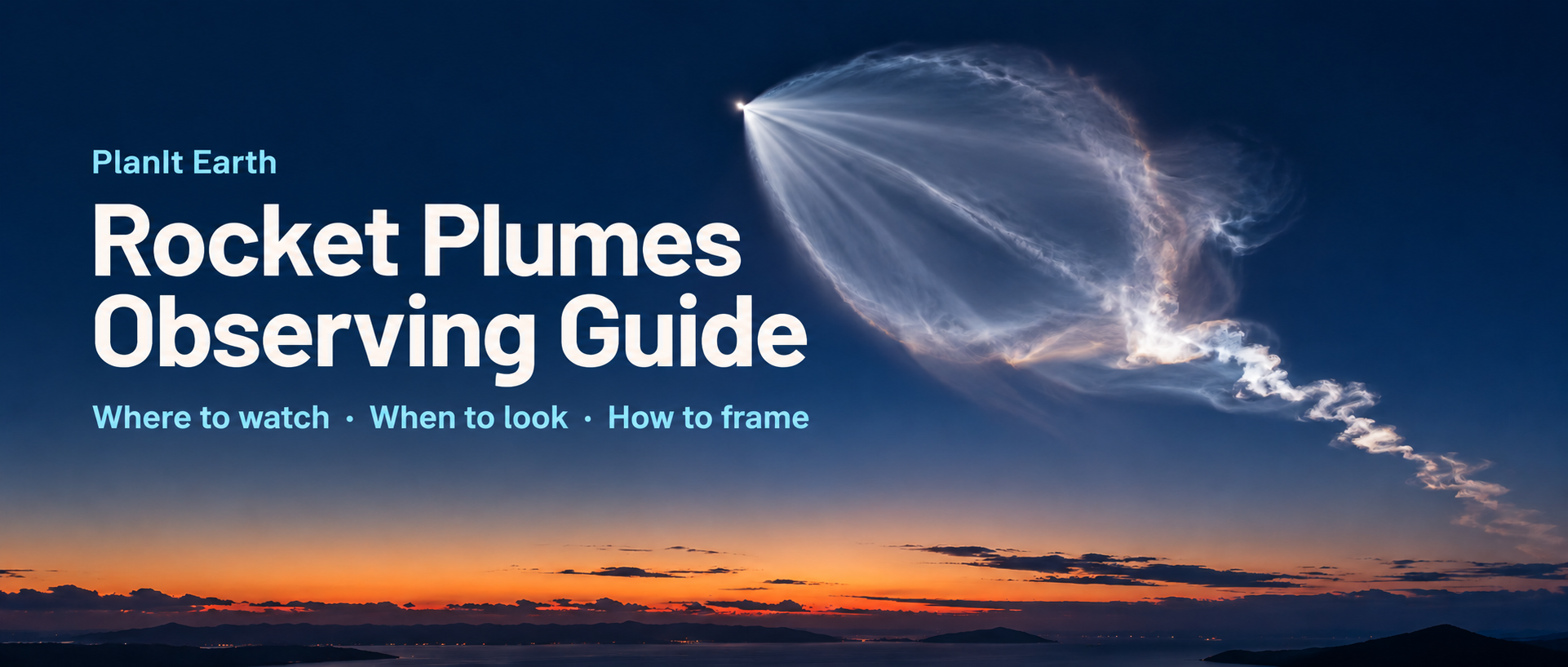
A rocket launch can offer much more than a streak of flame near the launch pad. Minutes after liftoff, a luminous cloud may unfold like a jellyfish or a spreading fan, visible far from the launch site.
The launch time alone cannot tell you whether to go. You also need the flight direction, sunlight at altitude, local sky darkness and clouds along the viewing direction. PlanIt Earth brings these into one workflow: choose a launch, compare cities, check direction and weather, then choose the actual camera position.
1. How a twilight rocket plume forms
A high-altitude exhaust plume can scatter sunlight while the observer’s sky is already dark after sunset, or still dark before sunrise. As the exhaust expands in thin air, its illuminated structure can stand out against the darker background.
Three conditions need to come together:
- Sunlight at altitude: the relevant flight segment must still be illuminated.
- A suitable background sky: a bright sky can overwhelm the plume.
- A clear line of sight: the illuminated segment must rise above your horizon, with no intervening terrain, buildings or cloud blocking it.
A darker sky usually helps only while the plume remains sunlit. Once it enters Earth’s shadow, waiting for greater darkness will not restore sunlight. Night at the pad does not mean the entire trajectory is in shadow, and being closer to the pad does not necessarily give a better view. Follow the flight path rather than drawing a simple distance circle around the launch site.
2. Find the feature and recognize the controls
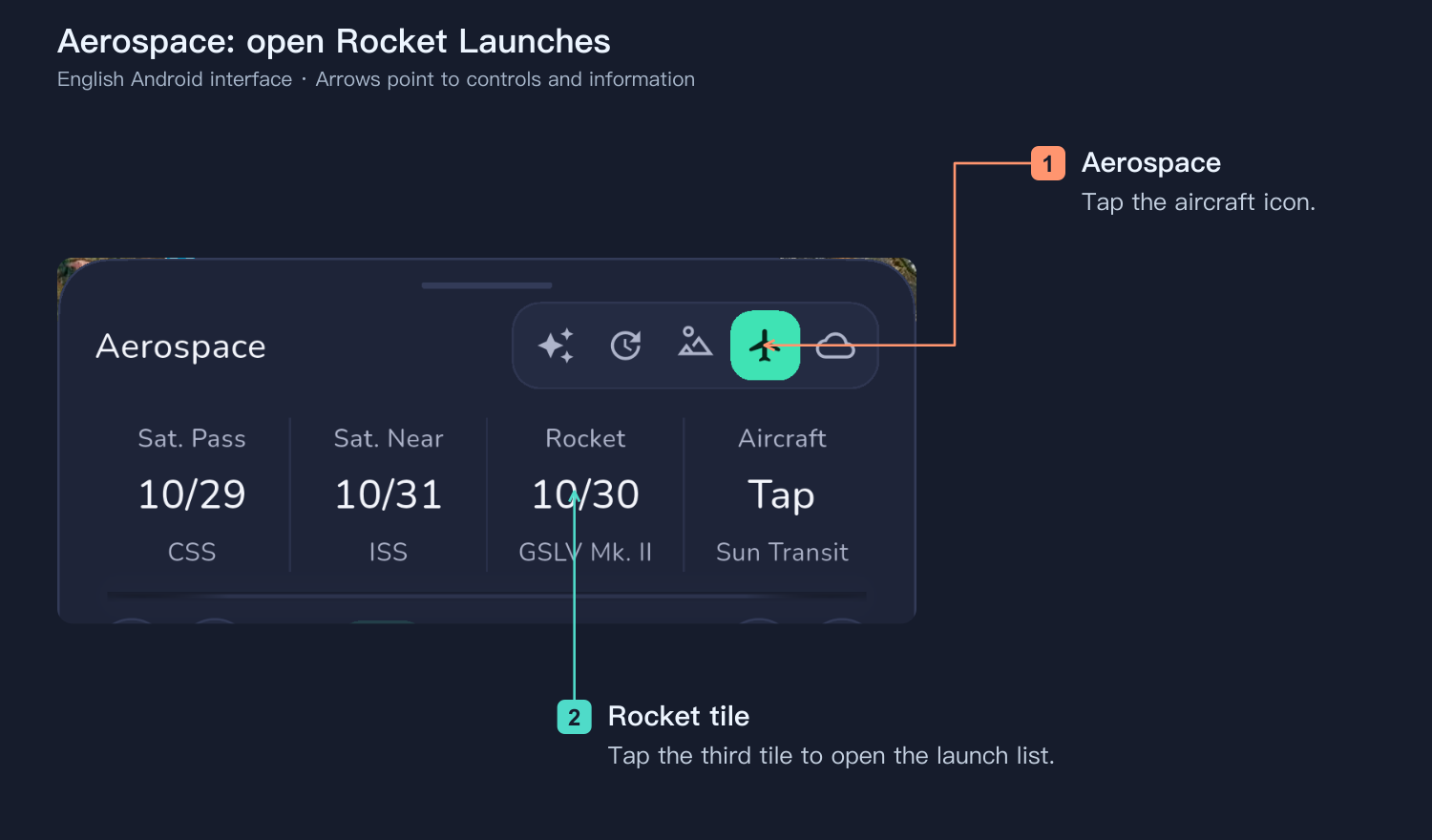
Expand the date/time panel beneath the main map, select Aerospace, then tap the third tile, Rocket.
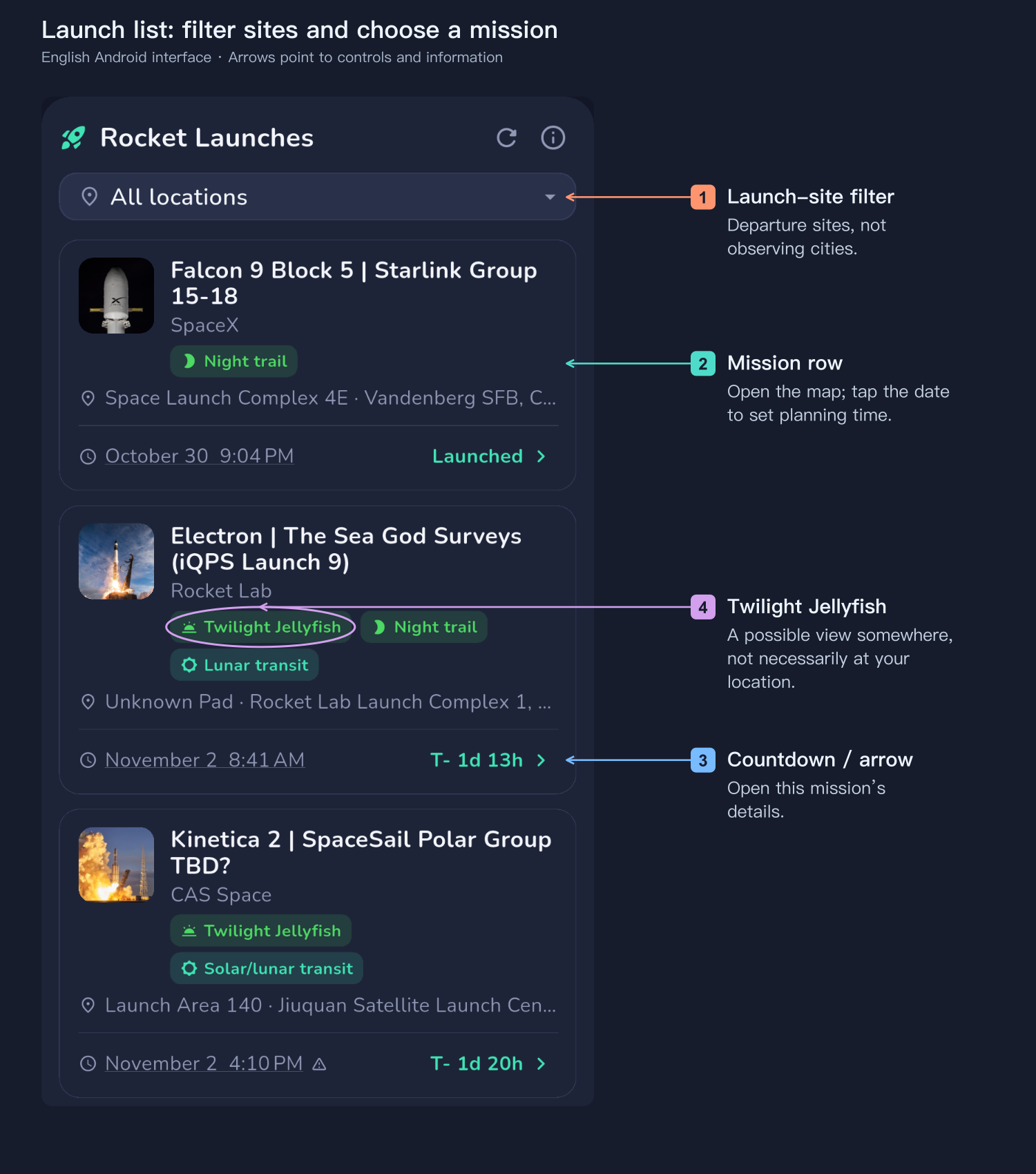
The Twilight Jellyfish badge means the current model finds a potential viewing opportunity somewhere for this launch. It does not mean the plume is visible from your location. Continue to the map and city conditions.
- Launch-site filter: show launches from selected sites; multiple selection is supported. These are departure sites, not observing cities.
- Refresh: update missions and their available data; refresh again near the event.
- Main part of a mission row: open the flight path and visibility map.
- Date/time: move the planning clock to that launch. Countdown or right arrow: open the mission details. The details page also provides a visibility-map button.
- Plume viewing conditions by city: compare the geometry, then inspect the weather in the viewing direction.
3. Confirm the mission before assessing your location
Open the details using the countdown or arrow. Check the mission, launch site, scheduled time, status and time precision. Distinguish your device time, launch-site time and UTC. A date-only estimate, tentative mission or wide launch window should not be treated as an exact shooting time.
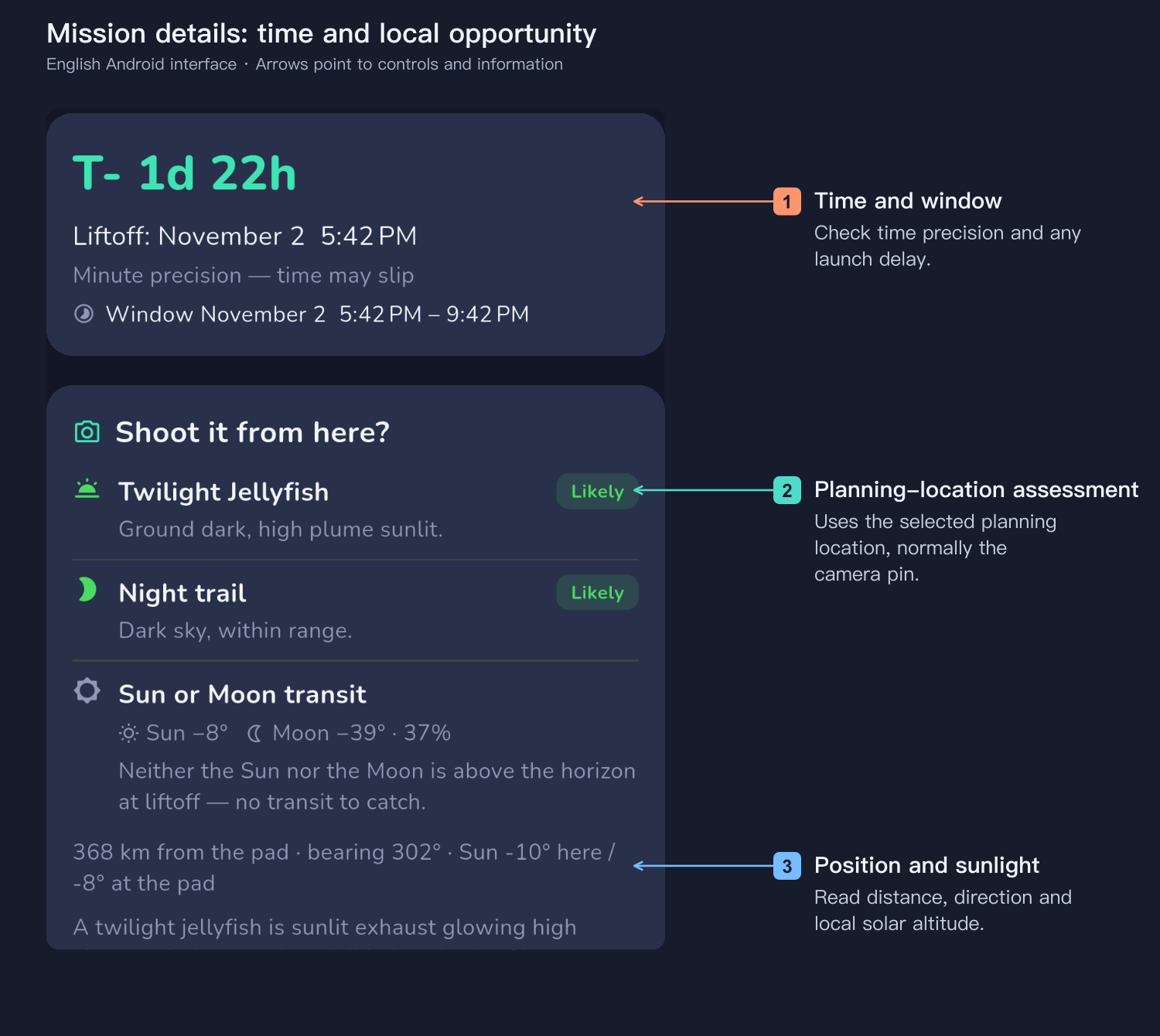
Twilight plume, night trajectory and solar/lunar transit badges describe different opportunities. A twilight plume depends on sunlight illuminating high-altitude exhaust; a night trajectory records the luminous engine’s path. One opportunity does not imply the others.
The “Can you photograph it here?” assessment uses the selected planning location on the map, normally the camera pin—not the phone’s GPS position. A different selected pin changes that location. Without a pin, the map center or other current planning-location fallback is used. The city page’s Your Location summary, by contrast, uses the device’s location.
4. Understand green and purple on the map
First confirm which mission and trajectory are loaded. The potential viewing region runs from purple at a local solar altitude of 0° to green at −6°. Purple indicates a brighter twilight background and lower contrast; green indicates a darker background. Below −6°, the region stays green. Places where the Sun is above the horizon are not colored.
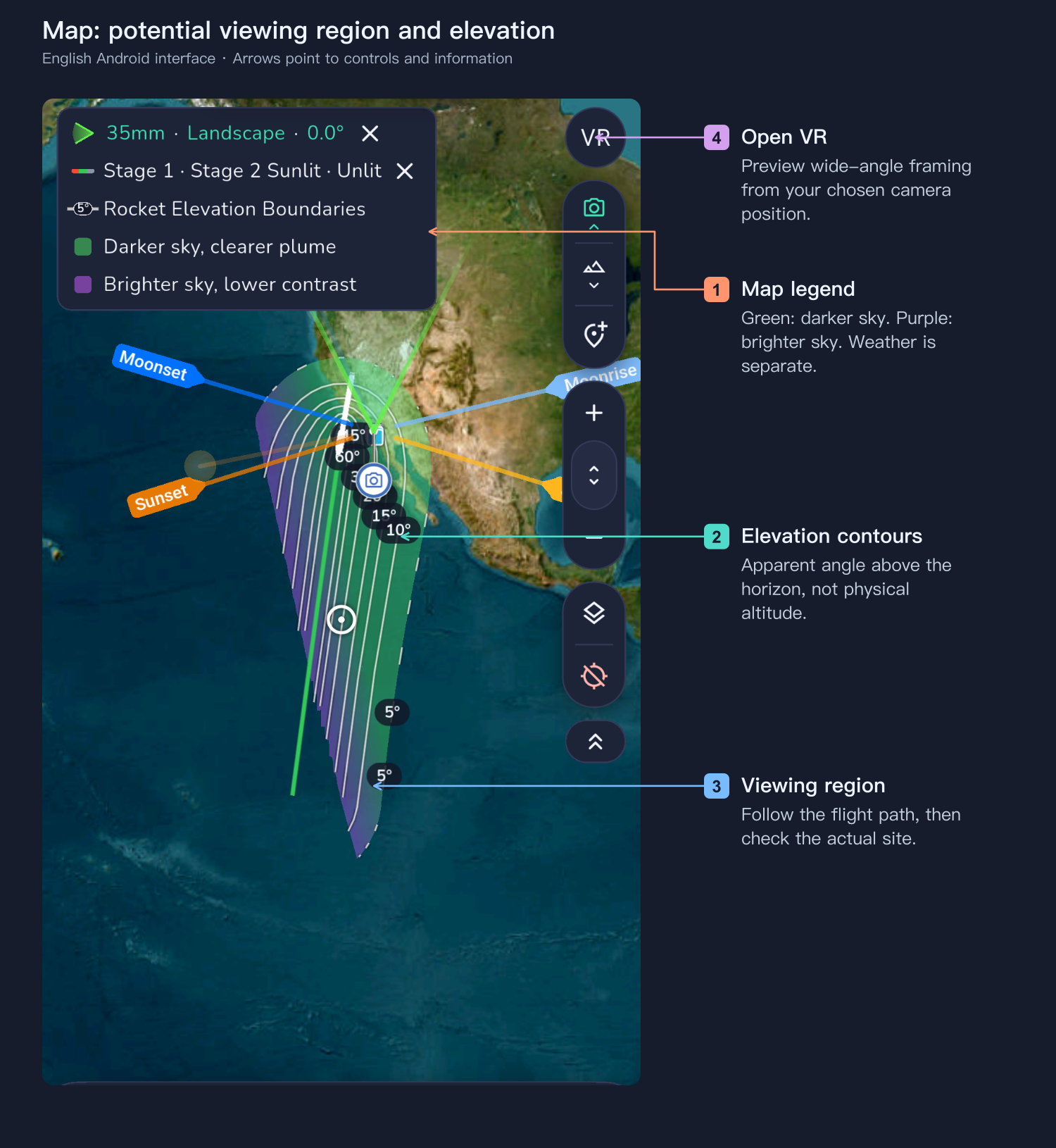
The calculation uses illuminated flight segments and an observer elevation angle greater than 5° as the basic city-viewing threshold. Five degrees is still low, so trees, ridges, buildings and haze matter. Being inside the colored region is not a guarantee of an unobstructed view.
Elevation contours describe how high the trajectory appears above the observer’s horizon. They do not show cloud thickness, brightness or plume radius. Physical altitude in kilometers and an observer’s elevation angle in degrees are different quantities. Map colors do not include weather.
5. Read the city conditions
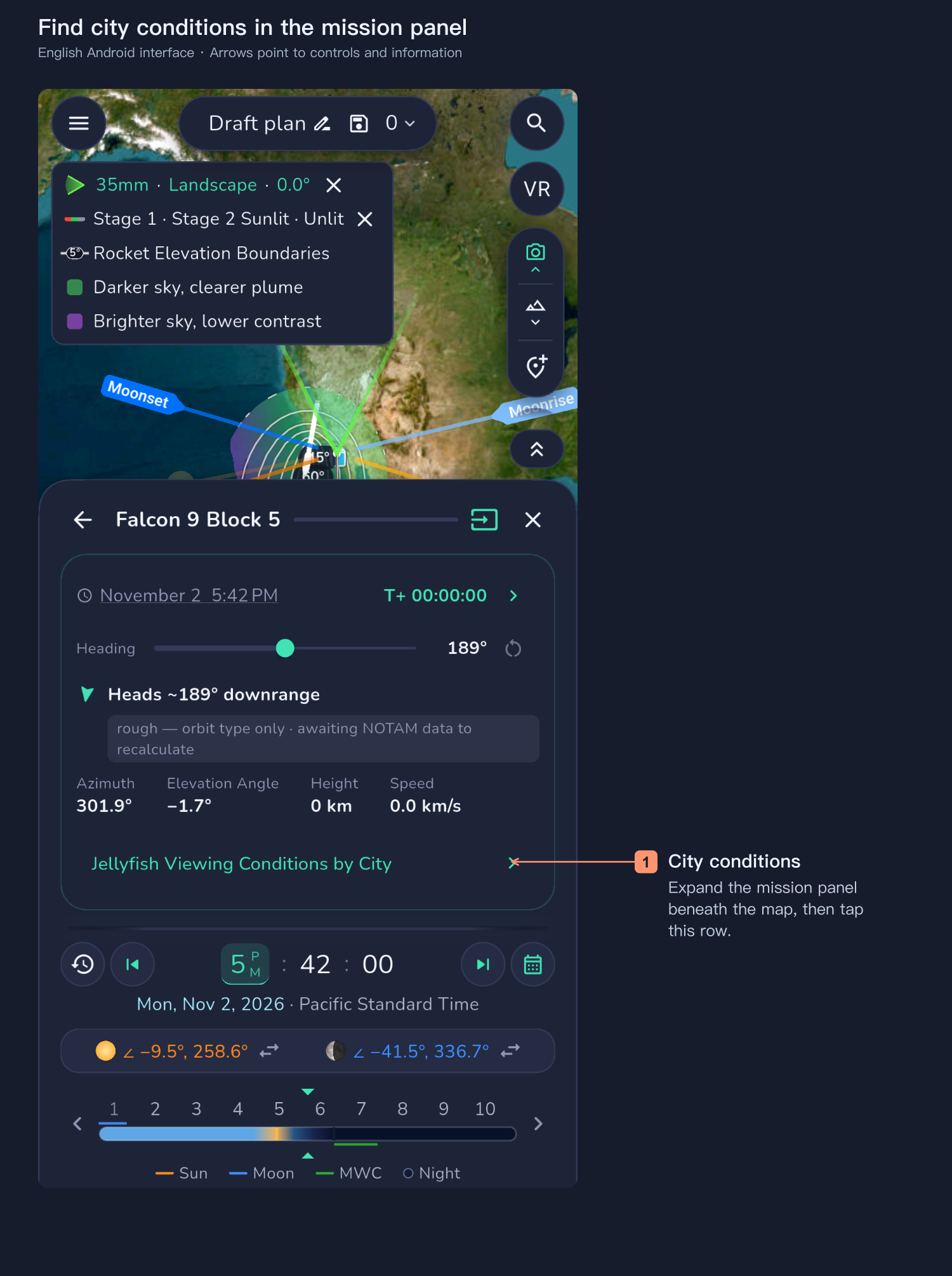
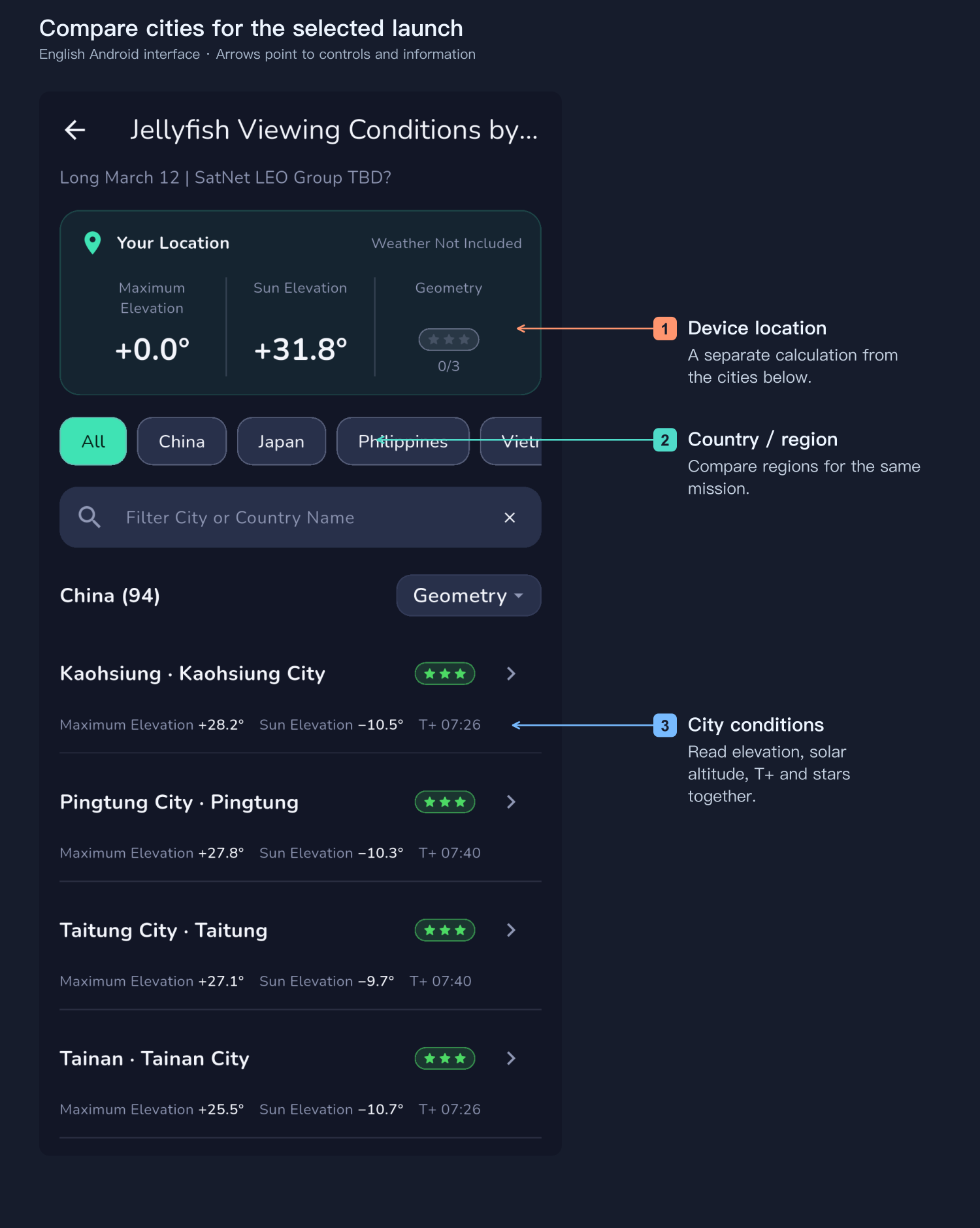
Open the mission panel on the map and select the city-viewing-conditions row.
Geometric conditions means assessing the observer position, trajectory, elevation angle, local solar altitude and illumination without considering weather. It is an initial screening under an unobstructed-sky assumption; cloud and the actual site must still be checked.
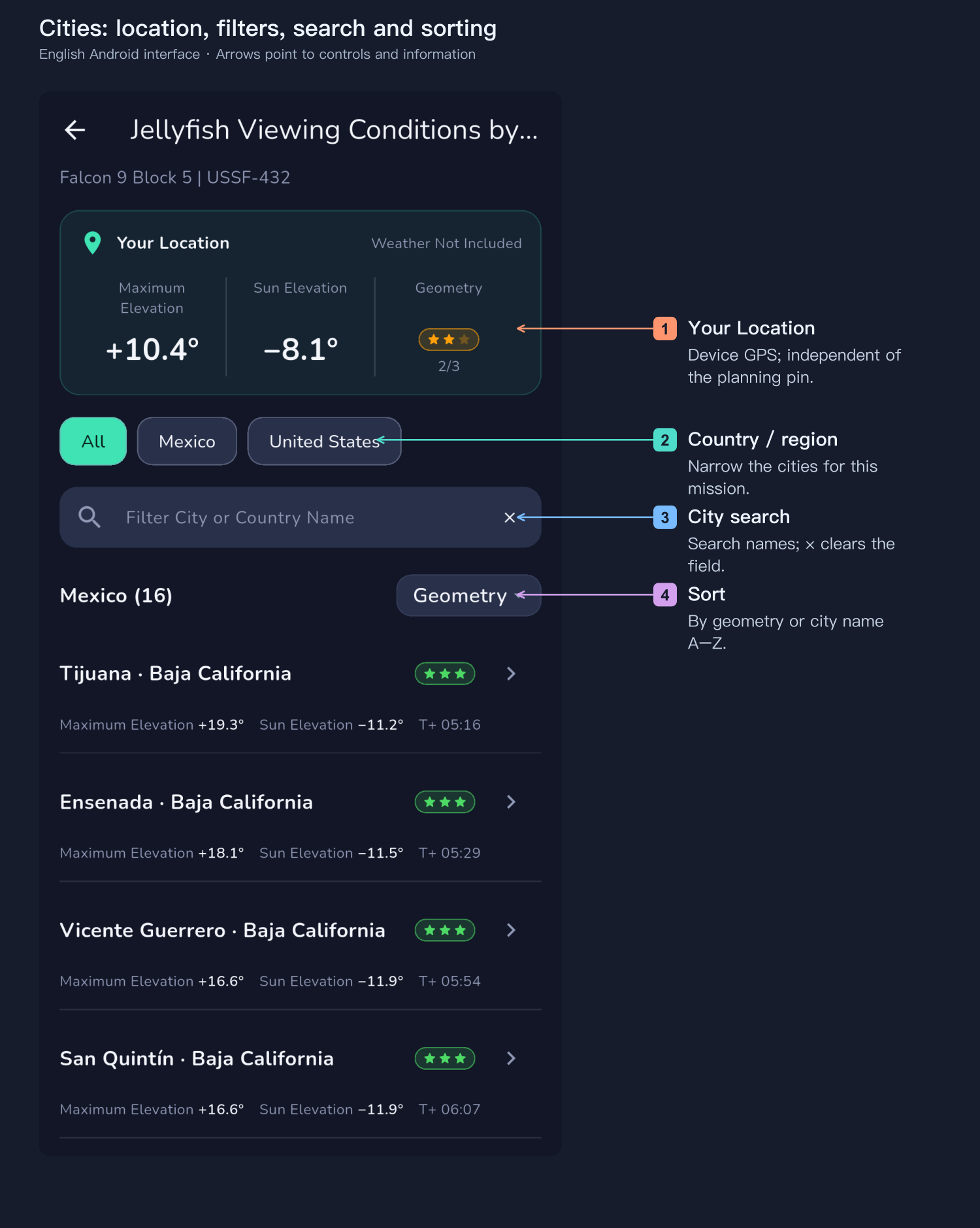
- Your Location: the device’s GPS summary, independent of the planning pin. Moving the map to a distant city does not move the phone. Unknown angles call for checking location and trajectory data.
- Country/region: narrow the city list for this launch.
- City search: use local or English names, or a country name; × clears the field.
- Sort: geometric conditions prioritize the higher-scoring cities. City-name A–Z is also available.
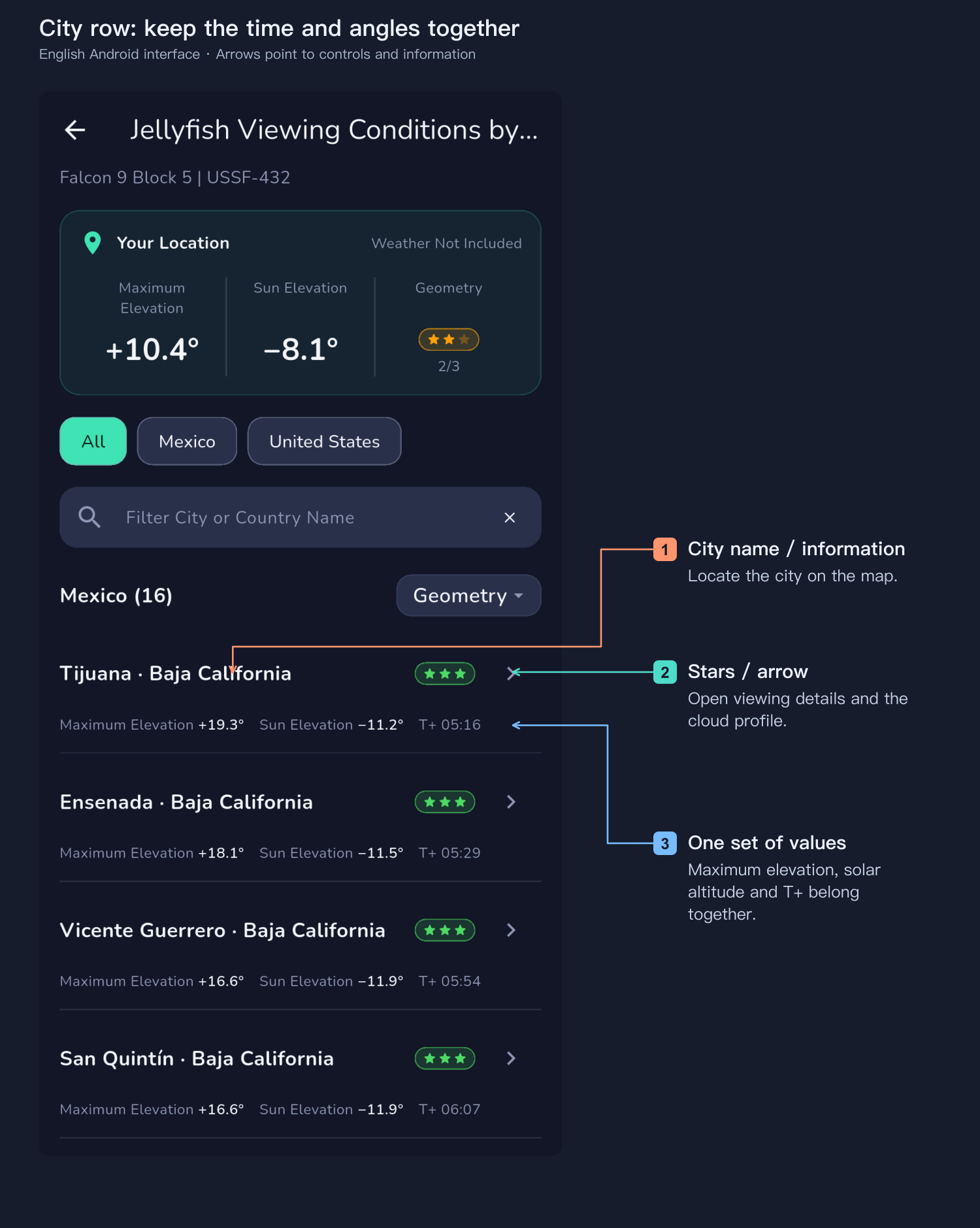
Maximum elevation, solar altitude at that moment and T+ form one set of values. Read them together. T+ is elapsed time after liftoff, not a clock time. A separately listed Best Observation has its own time and direction; do not combine its time with another row’s angles.
The stars screen geometry and do not include weather. Zero stars for the device position do not rule out other cities. Tap a city’s name/information to locate it on the map; tap the stars or arrow to open its viewing details and cloud profile. Representative-city coordinates are city centers. A nearby hill, beach or neighborhood can differ, and an unlisted town is not necessarily excluded.
Two real mission examples
These examples were read in the application on 31 October 2026, using the trajectories available then. Both were rough estimates based on orbit category, not confirmed flight telemetry or final launch announcements. Times, trajectories and weather can change.
Long March 12: before sunrise in China
The listed mission is Long March 12 | SatNet LEO Group TBD?, scheduled for 2026-11-05 21:15 UTC, or 6 November at 05:15 China Standard Time. The cities below have dark ground skies while, under the current model, the relevant high-altitude segments remain sunlit. Both conditions are needed before comparing their viewing angles.
| City | Maximum elevation | Sun at that time | T+ | Geometry |
|---|---|---|---|---|
| Guangzhou | 17.2° | -17.2° | 06:20 | ★★★ |
| Shenzhen | 21.9° | -16.3° | 06:20 | ★★★ |
| Shantou | 22.2° | -14.1° | 06:33 | ★★★ |
| Xiamen | 17.5° | -13.0° | 06:59 | ★★★ |
| Fuzhou | 12.2° | -12.2° | 07:13 | ★★☆ |
| Haikou | 12.9° | -19.4° | 06:20 | ★★☆ |
| Wenzhou | 7.9° | -11.3° | 07:40 | ★☆☆ |
| Beihai | 9.4° | -20.7° | 06:20 | ★☆☆ |
Shenzhen and Shantou have higher tracks in this example. Wenzhou and Beihai are also dark but have lower viewing angles, making horizon and low-cloud checks particularly useful. Proximity to the launch area does not automatically give Haikou the highest rating.
USSF-432: after sunset in California
Falcon 9 Block 5 | USSF-432 is listed for 2026-11-03 01:42 UTC, or 2 November at 17:42 PST in California. Ground observers are past sunset, but the relevant high-altitude segments remain illuminated in the current model. The mission, map and Los Angeles weather screenshots use this launch.
| City | Maximum elevation | Sun at that time | T+ | Geometry |
|---|---|---|---|---|
| Santa Barbara | 28.1° | -9.1° | 03:40 | ★★★ |
| Los Angeles | 20.6° | -10.4° | 04:39 | ★★★ |
| San Diego | 19.1° | -11.2° | 05:16 | ★★★ |
| Tijuana | 19.3° | -11.2° | 05:16 | ★★★ |
| San Jose | 10.8° | -8.2° | 04:52 | ★★☆ |
| San Francisco | 9.3° | -7.9° | 04:52 | ★☆☆ |
| Las Vegas | 8.1° | -13.3° | 05:16 | ★☆☆ |
| Phoenix | 6.3° | -15.6° | 05:41 | ★☆☆ |
Both tables already filter for sunlit high-altitude segments. The solar-altitude column describes the Sun relative to the city’s horizon; it cannot by itself determine whether the plume is illuminated. Earth-shadow geometry is assessed separately. In these two examples the best-observation time happens to match the highest eligible point. That need not hold for another mission.
6. What one, two and three stars mean
The rating combines the apparent height of the illuminated trajectory and local sky darkness. It is neither a weather forecast nor the detail-quality rating used for space-station transits.
- ★☆☆: elevation greater than 5°, with local solar altitude at or below 0°. The track may still be low or the sky bright. A Sun above the horizon earns no stars.
- ★★☆: at the same illuminated sample, elevation at least 10° and solar altitude below −3°.
- ★★★: at the same illuminated sample, elevation at least 15° and solar altitude below −6°.
The application searches the illuminated trajectory for the highest rating. During a flight of a few minutes, the local Sun normally moves only a few degrees. Best observation can differ from the highest point when a boundary such as −3° or −6° is crossed: at dusk a slightly later, lower point can score better as the sky darkens; near dawn, the better time can be earlier. Keep the highest-point and best-observation data sets separate.
7. Check clouds toward the rocket
Tap the stars or arrow for a city. Read the elevation curves and the cloud profile in the selected viewing direction.
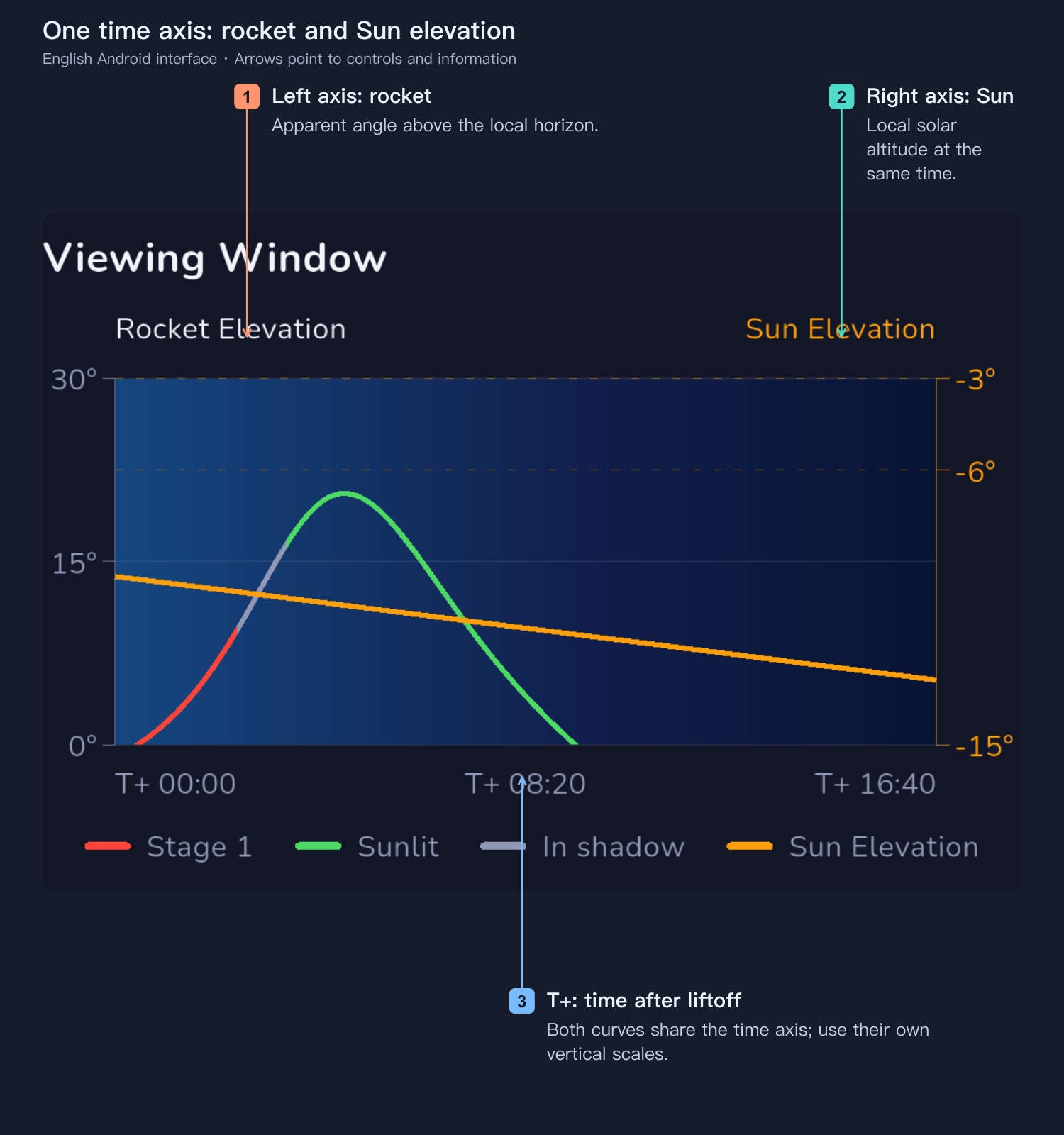
The shared horizontal axis is elapsed time after liftoff. The left axis is rocket elevation; the right is local solar altitude. Read each curve against its own scale. Use the legend to distinguish first-stage, shadowed and illuminated segments; uncertain staging information must not be treated as confirmed.
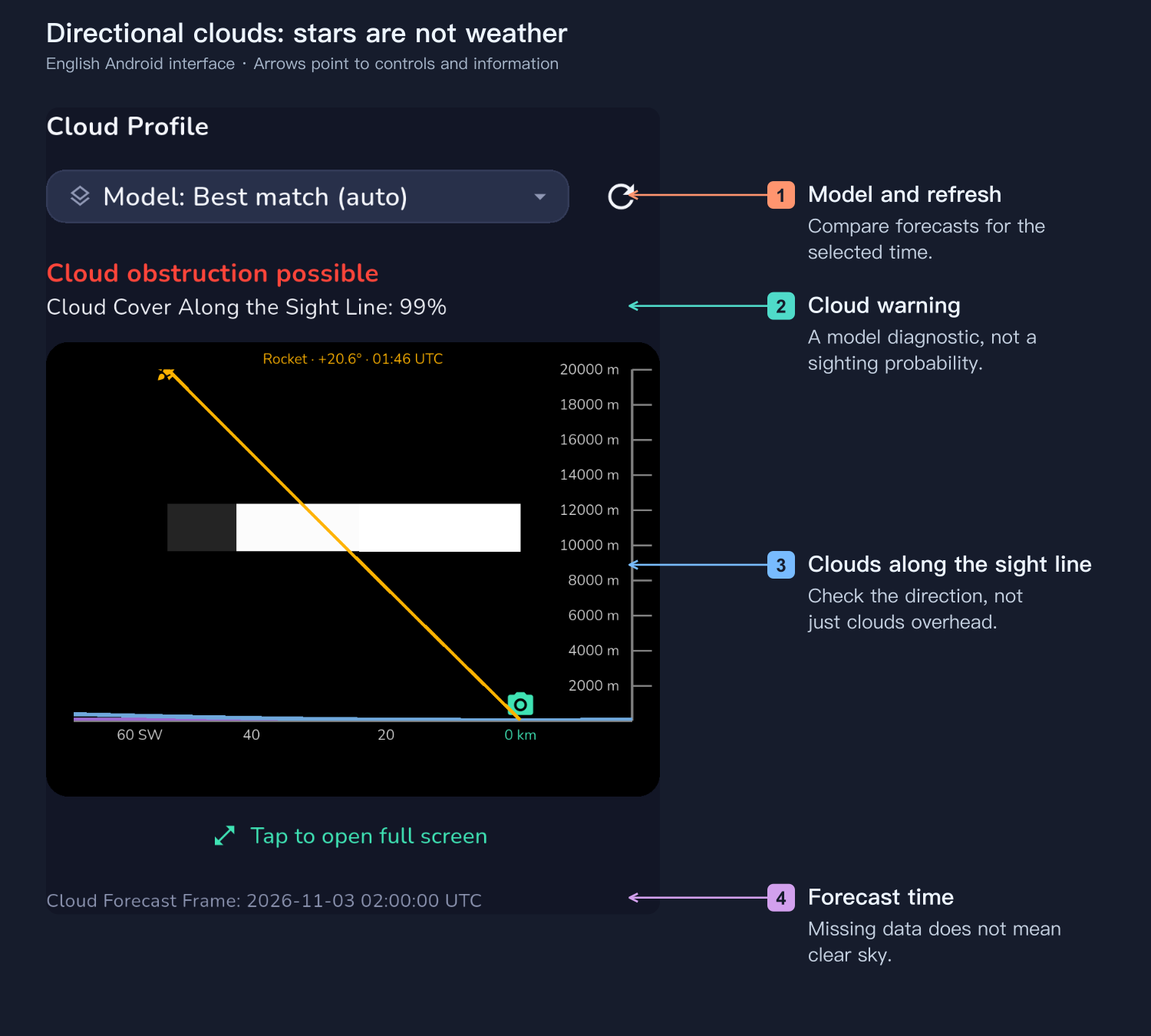
Clear overhead does not necessarily mean clear toward a low rocket. The line of sight may pass through distant low, middle or high cloud. This page checks the best-observation direction and elevation for the selected city, rather than relying only on a whole-city cloud total.
Change the weather model or refresh as needed, and inspect the forecast time. Missing data or a launch beyond the forecast range means unknown conditions, not a clear sky. In the Los Angeles example the geometry has three stars while the model reports possible cloud obstruction. Its cloud percentage is a model diagnostic, not the probability of seeing the plume.
8. On site: direction, timing and VR composition
- Choose an open view toward the predicted track, especially near a low horizon.
- Confirm the actual camera position on the map. Use VR to compare the trajectory, timing and foreground; do not simply point at the launch pad.
- Arrive early enough to focus and test. A distant observer may wait several minutes after liftoff for an illuminated segment to enter the view.
- Watch mission updates. A delay can change timing, sunlight and city conditions; recalculate using the revised launch time.
- Treat actual liftoff as T+0. A delayed livestream is not a precise camera time reference.
Use VR for wide-angle framing
For combining a rocket plume with landscape, tall buildings or mountain peaks, PlanIt Earth’s VR viewfinder is the ideal composition tool. Place the camera pin at the intended site and set the actual focal length. Compare where the track rises beside a building or passes above a summit, and how much sky the composition needs. You can compare locations and pointing directions before leaving home.
From the main map, tap VR at the upper right. Keep the planning time near the selected launch, set a wide-angle focal length and drag the sky to inspect the route through the frame.
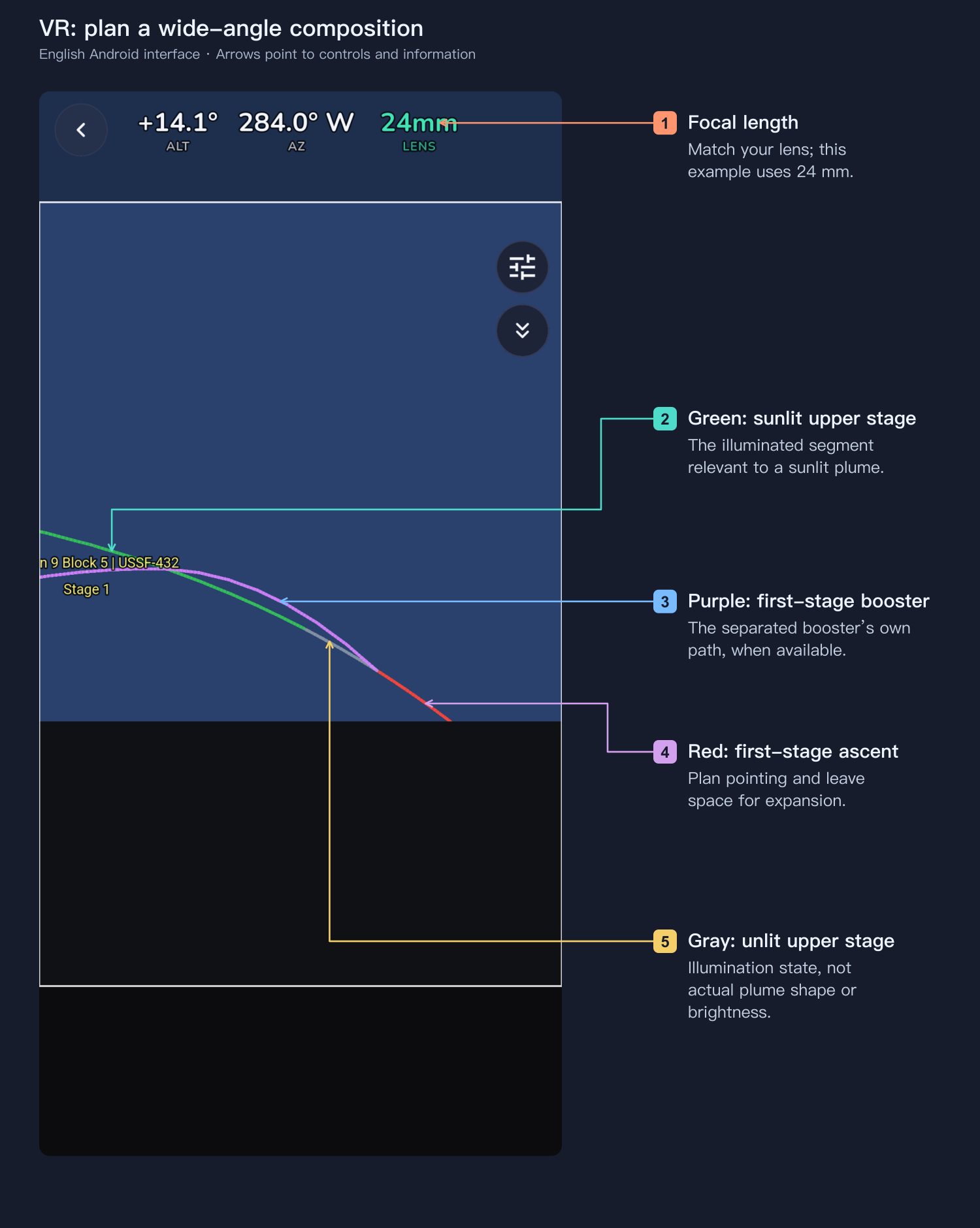
- Red: first-stage ascent.
- Green: illuminated upper-stage track after separation.
- Gray: unilluminated upper-stage track after separation.
- Purple: the separated first-stage booster’s own trajectory, when such data is available.
Compare focal lengths to see how much of the track fits, plan the horizon and foreground, and leave room for the plume to expand. A trajectory line is not the cloud’s outer boundary, and green means sunlit, not a predicted brightness. The actual cloud shape and extent must be observed on site. A widening plume deserves more space than a tiny rocket marker.
9. Prepare the camera
Front, side and back lighting
Sunlight reaching the plume and brightness from a particular camera position are separate questions. Describing front, side or back lighting requires the relative positions of the Sun, plume and observer—not just local solar altitude.
We do not yet have sufficient comparative plume photographs and a validated brightness model to rank these lighting directions or quantify their effect. We therefore do not rank cities by front/back lighting or promise a brighter, more detailed result in one direction.
The present stars do not model scattering-angle brightness or detailed sky brightness in the viewing direction. Record the Sun–plume geometry, background sky and exposure settings, then compare actual photographs. Stars are not a brightness or aesthetic score.
For the overall cloud, favor a wider field with room for expansion and landscape. For rocket detail, consider a longer lens and the faster apparent motion and tracking it entails. Focus in advance on a suitable distant target, then verify stars or distant detail.
Adjust exposure to actual sky and plume brightness. Overexposure loses bright structure; an overly long exposure blurs moving detail. There is no universal setting for every launch, city and camera. Video records expansion, interval shooting records longer-term changes, and bursts let you select moments. Check power, storage and writing speed for the whole session. A phone can record the overall development too; keep framing and focus steady and avoid excessive digital zoom.
10. Final checks
The trajectory may come from imported data, configured parameters or an estimate. Check its source, launch time, direction and staging information, and refresh near the event. The application identifies potentially illuminated, geometrically viewable segments; it cannot guarantee cloud formation, brightness, lifetime or a spectacular result.
- Confirm mission, status, launch time and time zone.
- Select the observing city and actual camera position.
- Distinguish maximum elevation from best observation, and use actual liftoff for T+0.
- Check the viewing-direction cloud profile and local obstructions.
- Refresh after a timing change.
- Finish focus and test exposures, with adequate battery and storage.
Start with the city list, then narrow the choice using the map, timeline and directional weather: where will you stand, which way will you look, and how long after liftoff should you watch?